AI Coach privacy
A one-time consent prompt, exactly what it can and can't see, and how to revoke access at any time.
Before the AI Coach can use your data, you'll get a one-time consent prompt explaining exactly what it can see. Revoke it any time from Settings → Account.
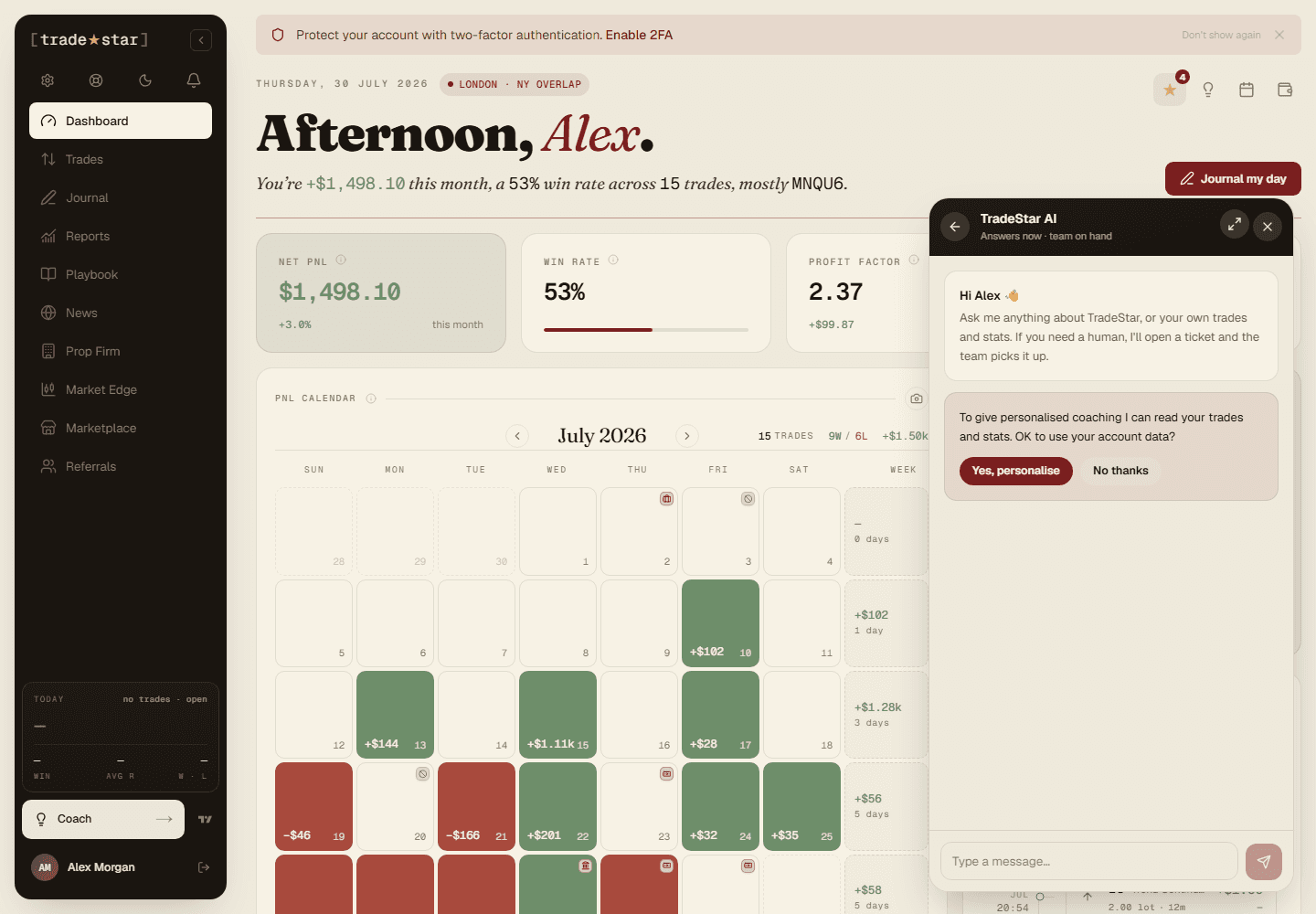
What it can see
Trade data
Symbols, dates, P&L, side, duration, entry/exit prices, strategy assignments.
Performance metrics
Win rate, profit factor, expectancy, drawdown, Star Score.
Journal notes
Your daily journal entries and trade notes, if shared with the AI.
Account names
Account names and types (Live/Demo) for context.
What it can't see
- Your broker login credentials or API keys
- Your payment information or billing details
- Your email address or personal identification
- Your screenshots or uploaded images
Where it runs
The AI is powered by a third-party large language model provider. Your data is sent there for processing but isn't stored, used for training, or shared onward, see our Terms of Service for the full detail.
Turning it off
Revoke access any time from Settings → Account. The Coach then works as a general help assistant only, with no access to your trading data.
AI Trading Coach
A conversational assistant grounded in your actual trades, not generic advice, performance analysis, pattern detection, and trade review.
Edge API
A personal key, five endpoints, and a full interactive reference that's always current, since it's generated from the same code the API runs on.